How to Use QR Generator:
Complete Visual Guide
Create custom branded, high-converting QR codes in minutes. Follow our guided 4-step workflow, understand static versus dynamic routing, and master commercial print sizing for flawless real-world scanning.
Select Your QR Code Type & Campaign Goal
Start by choosing the purpose of your QR code. Our studio provides 13+ specialized formats tailored for direct consumer actions:
- Website URL: Direct scanners to eCommerce shops, portfolio links, or marketing campaign pages.
- vCard Contact Card: Allow customers to save your phone, email, and company with a 1-tap contact prompt.
- WiFi Quick-Connect: Let guests and cafe visitors connect to Wi-Fi instantly with zero typing.
- PDF Menus & Catalogs: Share digital menus, real estate brochures, and product manuals touchlessly.
- UPI & Payment Links: Instant zero-commission payment collection with pre-configured amounts.
Routing Decision: Static vs. Dynamic
Choose Static if you need a permanent, lifetime QR code that encodes data directly without server redirects. Choose Dynamic if you want to edit destination links anytime without reprinting and track scan analytics.
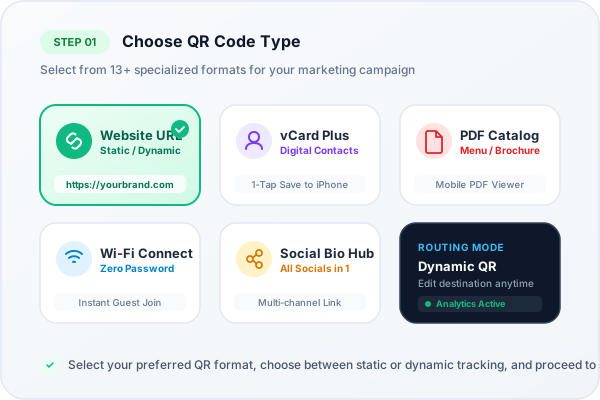
Visual Step 1: Format selection and Static / Dynamic mode toggle
Enter Content & Build Your Mobile Landing Page
Input your content into smart form fields engineered for each QR type. When creating dynamic codes like vCard, PDF, or Social links, a live smartphone preview updates instantly on your screen:
- Live Smartphone Viewport: See exactly what customers will see when they point their camera at your QR code.
- Theme Palette & Hero Banners: Choose modern presets (Teal, Purple, Slate, Rose) or enter your exact brand hex codes.
- Call-to-Action Buttons: Add direct tap-to-call, email, Google Maps directions, or document download triggers.
Pro-Tip for Maximum Conversions
Keep your headline clear and concise (under 35 characters). Place the primary action button (e.g. "Save Contact" or "Order Online") at the very top of your landing page.
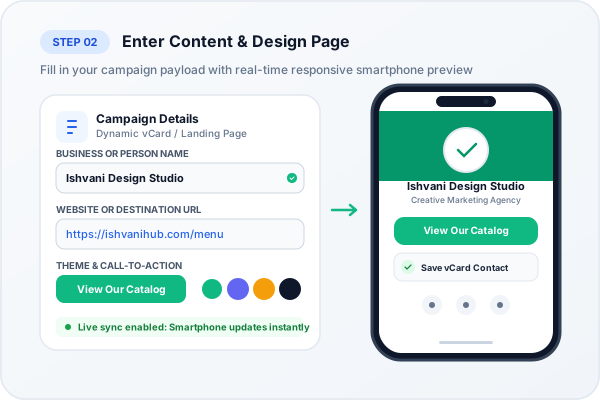
Visual Step 2: Content entry alongside interactive mobile viewport preview
Brand with Shapes, Custom Colors & Company Logo
Studies demonstrate that branded, stylized QR codes earn up to 150% higher scan engagement than plain black-and-white barcodes. Our studio gives you complete visual control:
- 19 Dot Module Patterns: Choose rounded dots, elegant diamonds, classy squares, or fluid drops.
- 14 Frame & 18 Eyeball Shapes: Customize the three corner position finder eyes independently.
- Central Brand Logo: Upload your company logo (PNG, SVG, JPG) or select popular icons (Instagram, WiFi, YouTube).
- Reed-Solomon Level H Protection: Embeds 30% redundancy so your QR code scans reliably even with large central logos.
Automated WCAG 2.1 Contrast Safeguard
Our studio features an active contrast analyzer. If your chosen dot color is too light against your background, a warning alerts you to darken the foreground to prevent camera misreads.
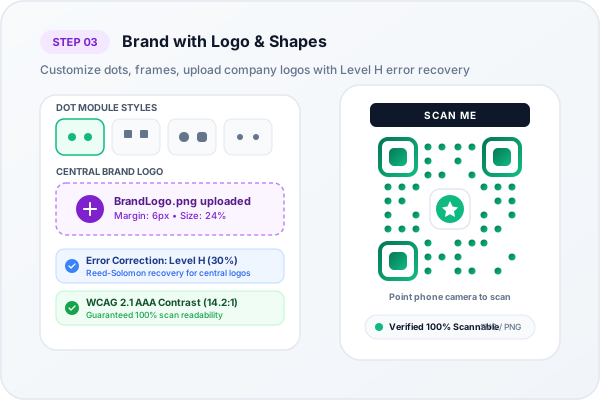
Visual Step 3: Dot shapes, frame styling, logo upload, and contrast check
Export Vector Formats & Monitor Live Scan Analytics
Once your design is perfected, download crisp print-ready assets and monitor engagement through real-time marketing dashboards:
- Lossless Vector SVG: Infinite resolution without pixelation, engineered for billboards, packaging, and commercial offset printers.
- Ultra High-Res PNG (2000px): Crisp raster image ideal for social media posts, desktop laser prints, and email signatures.
- Live Telemetry Dashboard: Track total scan counts, unique scanners, iOS vs. Android devices, and peak scanning hours.
- Geographic Insights: See which cities and regions generate your highest campaign conversions.
Instant CSV Export
Download full scan audit trails to Excel or Google Sheets for team meetings, marketing ROI attribution, and client reporting.
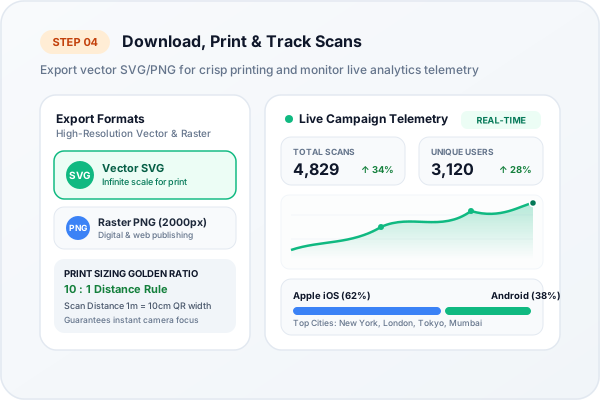
Visual Step 4: Vector format downloads and real-time scan analytics
Anatomy of a High-Scannability QR Code
Understanding the optical zones of a QR code ensures your custom designs never fail in commercial printing.
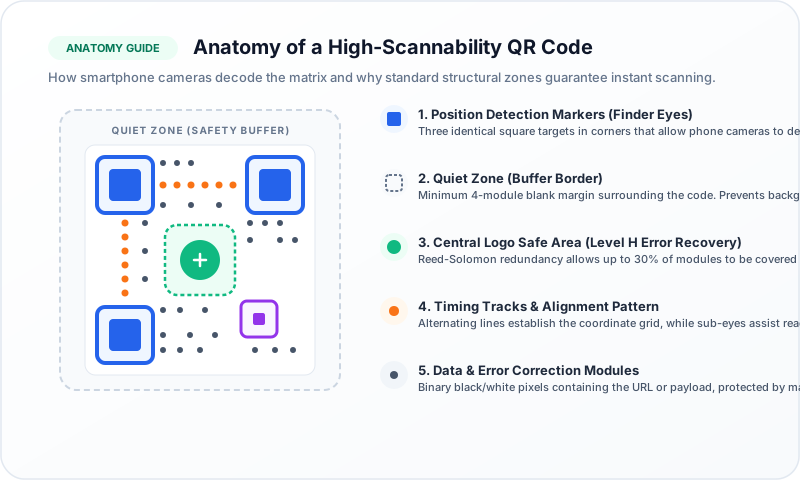
Visual Guide: Five core structural zones of an ISO/IEC 18004 compliant QR Code
Three large concentric squares in the top-left, top-right, and bottom-left corners. They orient the camera and allow scanning from any angle (360 degrees).
A clean, blank border around all four edges (minimum 4 modules wide). Prevents surrounding graphics or text on your flyer from disrupting the optical scanner.
Occupies up to 30% of the center area. Powered by Reed-Solomon Level H error correction, allowing smartphones to reconstruct missing dots automatically.
The inner pixel modules containing your encoded payload and alternating black-and-white timing tracks that calibrate the camera coordinate system.
Static vs. Dynamic QR Codes
Understanding the technical distinction helps you avoid costly reprints and choose the best route for your project.
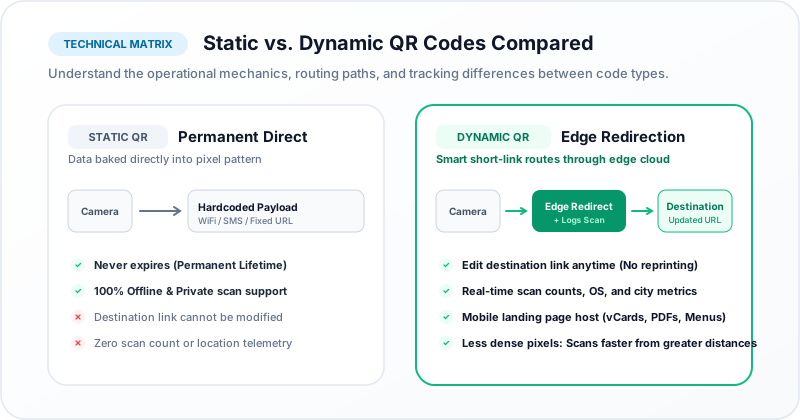
Visual Comparison: Direct payload storage vs high-speed edge cloud redirection
| Feature | Static QR Code | Dynamic QR Code (Recommended) |
|---|---|---|
| Edit Destination After Printing | Impossible (reprint required) | Editable anytime in dashboard |
| Scan Analytics & Tracking | No tracking possible | Real-time (City, Device, OS, Time) |
| Expiration & Lifetime | Never expires (Permanent) | Permanent with active account |
| Code Density (Pattern Complexity) | Increases with longer text/URLs | Compact & Clean (Short URL) |
| Offline Functionality | 100% Works offline (WiFi, Text) | Requires internet connection |
| Best For | Home Wi-Fi, fixed plain text | Business, menus, packaging, billboards |
The 10:1 Sizing Golden Rule
To guarantee effortless scanning under real-world lighting and varying camera qualities, calculate your minimum QR width using this standard formula:
Pre-Print Production Checklist:
Always supply vector SVG files to commercial printers for razor-sharp plate rendering.
Maintain dark foreground modules over a light background (avoid inverse dark-on-dark).
Preserve the 4-module quiet zone margin on all sides of the matrix.
Test the printed prototype with both an iPhone and an entry-level Android phone.
Frequently Asked Questions
Everything you need to know about generating, customizing, and printing QR codes.
Are the QR codes generated on this website really free?
Yes! You can generate unlimited static QR codes for website URLs, contact vCards, WiFi credentials, plain text, and UPI payments 100% free with no expiration date and unlimited scans. Dynamic QR codes with editable destinations and scan analytics are also available for registered users.
Will adding a logo in the center make my QR code hard to scan?
No. Our engine automatically applies Reed-Solomon Level H Error Correction, the highest standard in the ISO specification. This creates 30% redundant data bytes, allowing smartphone cameras to effortlessly reconstruct obscured pixels around the logo.
Can I change my QR code's destination URL after printing flyers?
Yes, if you select Dynamic Mode when generating your code. Dynamic QR codes route through a short redirection URL, allowing you to change the destination website, menu PDF, or contact details anytime from your dashboard without ever reprinting your flyers.
Which file format should I download for commercial printing?
Always download vector SVG format for print shops, packaging, billboards, and signage. Vectors can be scaled infinitely to any size without losing crispness. For websites, emails, and PowerPoint slides, high-resolution PNG is ideal.
Ready to Create Your Custom QR Code?
Start right now in our full-featured QR studio. Choose your format, design custom colors, upload your logo, and export print-ready vector assets in under 60 seconds.