How to Create a Free QR Code with Logo & Custom Colors (2026 Guide)
Learn how to build high-converting branded QR codes with your business logo, custom color palettes, and attractive 'Scan Me' frames.
Step-by-Step Visual Tutorial Available
Want interactive visual diagrams and print sizing formulas? Check out our visual guide.
QR codes have evolved far beyond plain black-and-white pixel grids. Today, businesses and creators use custom-branded QR codes with vibrant color palettes, stylized dot patterns, and prominent company logos to boost scan rates by up to 150%.
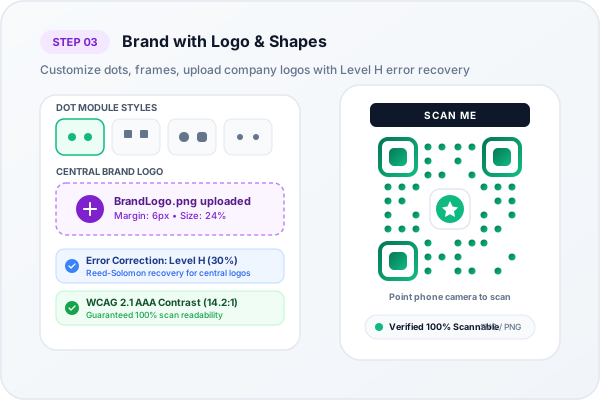
Uploading custom brand logos with Reed-Solomon Level H (30%) error recovery
Why Branding Your QR Code Matters
A plain QR code can look generic or even suspicious to security-conscious consumers. Adding a clear brand logo and a frame with a call-to-action like "SCAN ME" or "VIEW MENU" creates instant brand recognition and builds customer trust.
Key Insight: Error Correction Redundancy
QR codes use Reed-Solomon error correction algorithms. By utilizing Level H (High) error correction, up to 30% of the code area can be occupied by a logo without compromising scan reliability.
Step-by-Step Guide to Adding a Logo
- Select your QR Code Type: Choose between Website URL, Digital vCard, WiFi, or PDF.
- Enter your Destination Content: Input your target link or contact information.
- Upload your Logo: In Step 2 of our studio, click Upload Custom Logo or pick a preset brand icon. A square PNG or SVG with transparent background works best.
- Customize Dot Styles & Colors: Select rounded dots, classy square corners, and high-contrast colors.
- Download Vector SVG or High-Res PNG: For business cards or brochures, export vector SVG to guarantee crisp printing at any resolution.
Reed-Solomon Error Correction: The Math Behind Logo Protection
How is it possible to cover the center of a QR code with a company logo without breaking the scan? The answer lies in Reed-Solomon Error Correction, an algebraic error-correcting algorithm developed by Irving S. Reed and Gustave Solomon in 1960.
The QR specification defines four error correction levels:
- Level L (Low): 7% of data codewords can be recovered.
- Level M (Medium): 15% of data codewords can be recovered (standard default).
- Level Q (Quartile): 25% of data codewords can be recovered.
- Level H (High): Up to 30% of data codewords can be recovered.
When you upload a brand logo in our studio, our engine automatically forces Level H Error Correction. The generator creates redundant polynomial parity blocks across the matrix. The camera can treat the central area covered by your logo as 'damaged' or occluded data and mathematically reconstruct 100% of the destination payload from the surrounding redundant modules.
Ready to Create Your Custom QR Code?
Start generating scannable QR codes with custom colors, company logo, and lossless vector SVG export in seconds.