The Complete QR Code Customization Guide: Colors, Shapes, Logos & Contrast
Transform ordinary black-and-white grids into distinctive branded marketing assets with custom dot styles, frames, logos, and contrast safeguards.
Step-by-Step Visual Tutorial Available
Want interactive visual diagrams and print sizing formulas? Check out our visual guide.
A plain black-and-white pixel grid is functional, but it does nothing to showcase your brand identity. In crowded marketing environments, QR code customization increases customer scan engagement by up to 150%. However, improper styling can render a QR code unreadable by smartphone cameras. This guide explains how to customize QR codes beautifully while maintaining 100% optical readability.
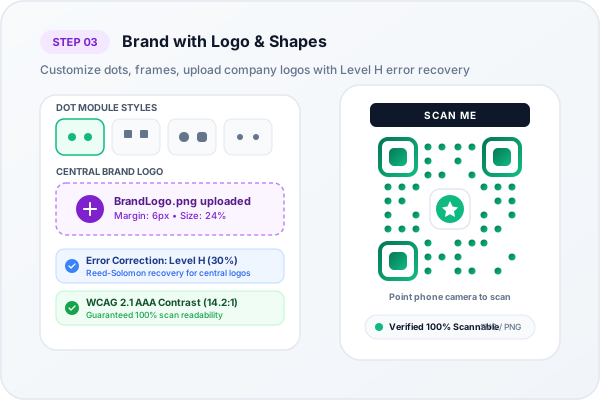
Styling module shapes, corner eyes, custom colors, and central logo branding
1. Customizing Dot Module Shapes
Our studio offers 19 distinct dot patterns to match your corporate aesthetic:
- Classy Rounded Dots: Soft, modern curves ideal for tech startups and lifestyle brands.
- Fluid Organic Drops: Elegant teardrop shapes perfect for wellness, beauty, and beverage packaging.
- Diamond Modules: High-end geometric luxury styling suitable for fashion and jewelry.
- Star & Cross Patterns: Bold, eye-catching textures designed for music festivals and event posters.
2. Outer Frame & Corner Eyeball Customization
The three large corner markers (known as Finder Patterns) orient camera sensors in 360 degrees. You can customize them independently with:
- 14 outer corner frame styles (rounded square, leaf, pill, octagon, circle).
- 18 inner eyeball pupil shapes (dot, target, diamond, flower, hexagon).
- Distinct corner eye colors to create striking two-tone contrast with body dots.
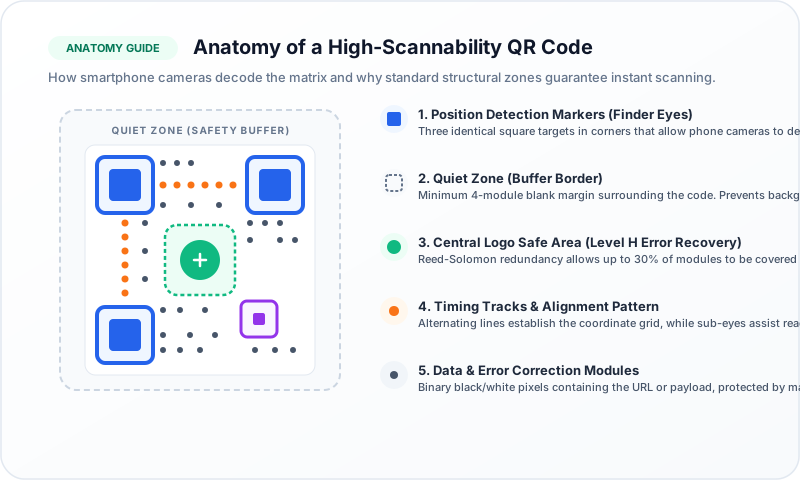
QR Code Anatomy: Preserving the Quiet Zone buffer and Finder Eye orientation
3. Uploading a Central Brand Logo Safely
Adding a corporate logo builds trust and reassures users that scanning the code is safe. But how does a camera scan a code when a logo covers the center?
The secret is Reed-Solomon Error Correction. Standard QR codes support four error recovery tiers:
- Level L (Low): 7% byte restoration capability.
- Level M (Medium): 15% byte restoration capability (default for plain codes).
- Level Q (Quartile): 25% byte restoration capability.
- Level H (High): 30% byte restoration capability (required for logos).
Our generator automatically applies Level H error correction whenever you upload a logo, giving the algorithm enough mathematical redundancy to recover obscured pixels instantly.
4. The Golden Rule of Color Contrast: WCAG 2.1
The most common mistake when customizing QR codes is insufficient contrast between the foreground and background:
- Always use dark modules on a light background: Cameras read dark dots against light reflections. Inverted codes (white dots on dark background) fail on many older smartphones.
- Minimum 4.5:1 Contrast Ratio: Our real-time WCAG checker warns you immediately if your selected colors are too faint.
- Preserve the Quiet Zone: Never crop out the white border surrounding the code; camera sensors need this margin to detect module coordinates.
Ready to Create Your Custom QR Code?
Start generating scannable QR codes with custom colors, company logo, and lossless vector SVG export in seconds.