How to Create a Digital Business Card (vCard) QR Code
Transform your professional networking with digital contact cards that allow anyone to save your details in their phone with one tap.
Step-by-Step Visual Tutorial Available
Want interactive visual diagrams and print sizing formulas? Check out our visual guide.
Traditional paper business cards end up discarded or lost within days. Digital business card QR codes provide a seamless, interactive solution that lets clients save your contact card with a single tap.
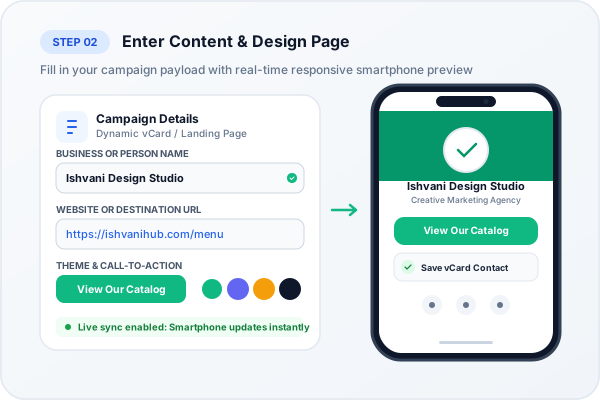
Live smartphone contact card preview with instant 1-tap 'Add Contact' action
Key Elements of a Modern Digital Business Card
- Profile Avatar / Headshot: Makes your profile memorable and personal.
- Contact Channels: Mobile, landline, direct email, and company website.
- One-Tap Add to Contacts Button: Directly downloads a standard
.vcffile that iPhone and Android save into their Contacts app. - Direct Calling & Emailing: Clickable phone and email buttons for instant communication.
Why Traditional Paper Business Cards Are Dying
According to sales and networking research, over 88% of paper business cards handed out at conferences and trade shows are thrown into the trash within one week. When someone receives a physical card, they rarely spend 5 minutes manually typing names, international phone numbers, company titles, and email addresses into their smartphone contacts. One typo in an email address means a lost deal.
A Digital vCard Plus QR Code solves this instantly. When a prospect or colleague scans your card with their iPhone or Android camera, their phone surfaces a native contact card containing your full name, job title, company, direct telephone, email, physical office address, and social links. Tapping 'Save Contact' records your profile directly into their address book in 2 seconds.
vCard 3.0 vs vCard 4.0 International Standards
Our generator adheres strictly to the vCard 3.0 (RFC 2426) standard, guaranteeing 100% compatibility across both iOS Contacts and Google Contacts without requiring special third-party reader applications:
- Full Name & Pronouns: First, Middle, and Last Name parsing.
- Multiple Phone Numbers: Mobile, Office Direct, and WhatsApp numbers.
- Digital Footprint: Company website, LinkedIn profile, and portfolio links.
- Physical Address: Street address with 1-tap Google Maps and Apple Maps navigation.
Ready to Create Your Custom QR Code?
Start generating scannable QR codes with custom colors, company logo, and lossless vector SVG export in seconds.